Tuesday, September 17, 2013

Taxonomy Terms with “And”


In considering best practices for developing taxonomy term labels or names, there is the question about the use of the word “and” within taxonomy terms. My previous two blog posts were called “Tags and Categories” and “Card Sorting and Taxonomies,” which demonstrate how common it is to have the word “and” in titles, headings, or other labels. By extension, does it work in taxonomy terms?

The standards for taxonomies, ANSI/NSIO Z39.19 Guidelines for the Construction, Format, and Management of Monolingual Controlled Vocabularies and ISO 25964-1 Thesauri and Interoperability with Other Vocabularies make no mention of terms with the word “and.” While it is not explicitly prohibited, it is neither mentioned as an acceptable form among the rather exhaustive list of term format types. Even the section on compound terms makes no mention of terms with the word “and.” So, one might conclude that terms should not have the word “and” within them. Yet it is not uncommon, especially in larger, more specialized taxonomies and thesauri.

The simple little word “and” can actually have two different meanings:
1)      the intersection of two concepts, to include only that which belongs to both, which is the Boolean operator AND
2)      the combination or union of two concepts, to include any of either, which is actually the Boolean operator OR.
When it comes to taxonomy terms, the word “and” could have either of the above two usages, and it’s very important to know which it is in which case.

“And” meaning AND

My blog post title “Card Sorting and Taxonomies” involves the first meaning, the intersection of both concepts, which in this case is the use and suitability of card sorting specifically for taxonomies. “Card Sorting and Taxonomies” is more concise than saying “the suitability of card sorting for taxonomies,” and taxonomy terms need to be concise. Examples of the use of “and” in this (Boolean AND) meaning in taxonomy terms that I have run across include:
    Children and Television
    Gender and Poverty

The choice of using “and” is significant. It means any intersection/relation of these two concepts. “Children and Television” comprises all of the following: children’s television shows, the impact of television (not just children’s programming) on children, the depiction of children in television, etc. Similarly “Gender and Poverty” covers various issues, such as data on poverty rates by gender, how poverty effects the genders differently, and reasons why more women are poor in developing countries.
It is easy to identify this meaning of the word “and” when the two concepts linked by the conjunction are quite distinct. In many taxonomies, the preferred policy is to avoid creating such terms, lest the taxonomy become too large and complex.

“And” meaning OR

My blog post title “Tags and Categories” involves the second meaning, the combination of both concepts. I described what tags were and what categories were and compared them. Examples of the use of “and” in this (Boolean OR) meaning in taxonomy terms that I have run across include:
   Measurement and Analysis
   Laws and Regulations
   Roads and Highways
   Maintenance and Repair
An additional example is the title of the online course I teach:Taxonomies and Controlled Vocabularies.”

The main reason to create such terms is that, while some content deals with one or the other of the two linked words, a significant amount of content really has to do with both, and users probably don’t care to make the distinction either, so it’s better to have just a single concept in the taxonomy. But one word is not equivalent to the other, so a taxonomy term cannot be created from just one word and the other designated as its nonpreferred term/synonym. Another situation for these types of taxonomy terms is a small browsable taxonomy that does not utilize/support synonyms. An additional reason to create them is that they can boost SEO (search engine optimization) in website labels by giving more words prominence. Finally, the combined terms can also appease competing stakeholders who both want their preferred label as part of the term name.

The difference in a taxonomy

If you have taxonomy terms with the word “and” in them, it needs to be clear which of these two Boolean meanings it is, not only to ensure accurate content tagging, but also to ensure the proper relationship of the term to other terms in the taxonomy. Recently I was reviewing a taxonomy with the term “Investment and Trade” and by itself, I could not determine whether it meant the intersection of combination of these two words, so I didn’t not know how it should be related to terms of “Investment” and “Trade.”

A term with the Boolean AND is a narrower term to terms of both its component parts, what is known as polyhierarchy. “Children and Television” is narrower to both “Children” and to “Television.” When there occurs a term with Boolean OR, such as “Measurement and Analysis,” it is expected that the component words to not exist as preferred terms in the taxonomy. Rather, each word “Measurement” and “Analysis” could be nonpreferred terms/synonyms for “Measurement and Analysis.

Friday, August 30, 2013

Card Sorting and Taxonomies

Card sorting is a common technique in information architecture for developing the organization of menu labels or categories on websites. It would thus seem to be a very suited methodology for developing all kinds of taxonomies, but in actual practice card sorting is not utilized for most taxonomy projects, at least not in my experience.

Card sorting gets its name from the paper-based approach of having numerous category or concept names written down each on a small index card, and then the cards can be sorted on a table into logical categories. Multiple stakeholders and/or test users are given the opportunity in turn to organize the cards as they deem appropriate, and the person administering the card sort, takes note of the choices and considers them for the actual organization structure. Today, card-sorting software, especially that which is web-based to allow remote access, has largely replaced the physical cards.

There are two variants to card-sorting exercises, the open card sort and the closed card sort. In an open card sort, participants sort the labeled cards in any groupings they see fit and then they assign their category groups with any group name they want. In a closed card sort, the participants are already presented with a set of named top category groups that they cannot change, and are asked to sort the labeled cards into the pre-assigned categories. Each type of card sort has distinct objectives and is suited for different stages of the project.

Open card sorting is a good way to get a new taxonomy from scratch off the ground when you have some concepts (extracted from the content) and don’t know how to organize them. However, this is increasingly no longer the scenario. It’s rare to start creating a taxonomy from scratch with no other reference for top categories. There are so many taxonomies in existence now for all subjects, that it’s easy to find a starting point as a model. Furthermore, the owner of a taxonomy may have already designated the top categories for business reasons.

The aim of closed card sorting is to determine in what broader category narrower categories belong, especially if there is uncertainty. But if a narrower category could rightfully belong under more than one category, rather than force a choice between one or the other based on a card sort, the subcategory could belong under both. This is what taxonomists call “polyhierarchy,” and it acceptable as long as the hierarchy is sound and valid in both locations. Thus, closed card sorting is only needed when you have decided you do not want polyhierarchy.  Polyhierarchy is generally a good thing, because it provides more than one navigation path to the same results, and different people choose different paths. Sometimes, however, polyhierarchy is avoided near the top levels of a taxonomy in order to maintain a sense of tree structure.

Card sorting is most practical for just two levels of hierarchy: concepts and their immediate parent categories. It’s possible but unwieldy to suggest to users that they may create three levels, and some card sorting software does not even allow it. Often it is more reliable to just run a second series of card sort testing for another hierarchical level in the taxonomy. However, running multiple card sort exercises for different hierarchical branches of a taxonomy can be quite impractical, if not also costly and time-consuming.

Finally, card sorting works only for traditionally hierarchical taxonomies. It does not work for faceted taxonomies, where terms from different facets/attributes are selected in combination to limit or filter search results. Faceted taxonomies are becoming increasingly common.

Card sorting continues to be useful for information architecture, though. When designing the structure of a website and its main and submenus, it can be difficult to decide what the categories should be, because the content of  a site can be unique or nonstandard. Additionally, polyhierarchy is not expected in submenus and could be confusing. Finally, website navigation is often not deeper than two or three levels, unlike many taxonomies that are often four or five levels deep and thus impractical to thoroughly design or validate with card sorting.

Wednesday, July 31, 2013

Tags and Categories

What does a taxonomy comprise and how does it work? Professional taxonomists may speak of “terms,” “nodes,” or “labels,” whereas most other people with a basic understanding of taxonomy might refer to “tags” or “categories.” A category is a well understood concept, and social media sites have made the notion of “tag” well known.

In addition to the different professional level of such jargon, there is also a distinction in meaning.  Ironically, it’s the professional terminology that is vague and the layman terminology that is more specific. Taxonomy “terms,” “nodes,” or “labels,” are all pretty generic and can all have various applications for different kinds of taxonomies, both for broad categorization and for specific indexing. “Tags” and “categories,” on the other hand, each tend to have distinct meanings. It’s not so much what they are, or even how they are organized, but rather how they are used.

Tags are for tagging.
That seems obvious. As for what is meant by “tagging,” that implies you put a tag on something. In fact, you can put more than one tag on something, and that’s typically encouraged in tagging. “Something” is typically an electronic file of some form of content, a document, image, video, database record, blog post, etc. Tags tend to be a brief label indicating what something is about. Tags can be very specific or relatively broad. Information professionals might prefer to call them “index terms.” An organized, alphabetized list of tags could serve as an index.

Categories are for categorizing.
This can also be called grouping or classifying. It implies putting something into a category, often represented as a file folder, whether an actual electronic folder path, or just a depiction of a folder icon. While categories have different levels of specificity, the name category implies a collection of things, so there is an implicit understanding that categories don’t get too specific. An organized structure of categories typically constitutes a hierarchical taxonomy.

Can something go into more than one category? In physical folders no (unless you make photocopy of the document for each folder), but in the digital world, often the answer is yes, but not always (again requiring the copying of files). It depends on the system, and it may involve some workaround. Even when it is possible to put a content item into more than one category, unlike tags, it is still preferable to have most content items assigned to only one category and a smaller number of them that may belong in two categories. For example, there may be a breadcrumb trail for the hierarchy of categories, and the breadcrumb trail may only take a single path. The idea is that the categories retain distinct meaning and usage through mostly distinct content.

Tags and categories together
Because tags and categories are different, it is possible to have both at the same time, especially if the categories are deliberately kept broad and the tags are relatively specific. Content management systems and digital asset management systems increasingly offer features of both categories and tags for managing content. In these cases, the challenge is to decide to what degree of classification to use the categories and to what degree to use the tags. That's exactly what I have done as a taxonomist on two recent consulting projects.

For the amateur taxonomist and indexer, one of the most common exposures to tags and categories is through blogs. Blogging software may permit the blog author to assign a tag or category to a blog post.  Whether the tags and categories are appropriately named and used is another issue, though. Blogger.com provides only one option, which it calls "Labels" and utilizes an icon for a tag in the blogging interface, but then displays them when published in the right margin under a heading called "Categories."  No wonder my "categories" don't look good; I had created them as if they were tags. Furthermore, the very specific subject matter of "The Accidental Taxonomist" blog makes its posts more suited for tagging than for categorizing. WordPress, on the other hand, gives the blogger both tools: tags and categories. If “The Accidental Taxonomist” blog eventually moves, you’ll know why.

Thursday, June 6, 2013

How Many Facets


Faceted taxonomies (taxonomies with attributes, dimensions, filters, etc. to limit search results based on the combination of selected criteria) are becoming increasingly popular with the support of web database technology. Unlike traditional hierarchical taxonomies, designing a faceted taxonomy first requires a decision on how many facets to create. There are various factors to take into consideration. 

What the content supports

The nature of the content is always the most important factor. It may seem ironic, but content that is more limited in scope can support more facets than content that it broad in scope. For example, an ecommerce site selling just computers, could have a relatively large number of facets by which to limit laptop computers: brand, price range, hard drive, screen size, operating system, processor brand, processor type, webcam inclusion, and online/in-store availability (9 facets). On the other hand, if a content repository comprises all kinds of articles, then there is not much else beyond “subject” and article type to classify them by (2 facets). (Other metadata fields, such as author, title, and date, may also be used to limit results, but these do not involve taxonomy terms.)

What the end-user user interface supports

More facets can be included, if they are stacked one above each other vertically, such as in a left-margin, than if they are displayed horizontally across the width of the screen. This is because horizontal scrolling is something users dislike and is avoided in content design, whereas limited vertical scrolled is acceptable.

Sometimes a website or intranet is created in a web content management system that does not give as much flexibility in taxonomy display. For example, SharePoint requires a horizontal list of facets, if the facets are to be used to filter content displayed in “columns,” where facet names are the column headers. Furthermore, SharePoint will by default create columns for document format type, content type, author, date created, and date modified. While you can hide these columns, if you want to use some of these defaults, that will limit the number of other descriptive facets for columns to about three or four.

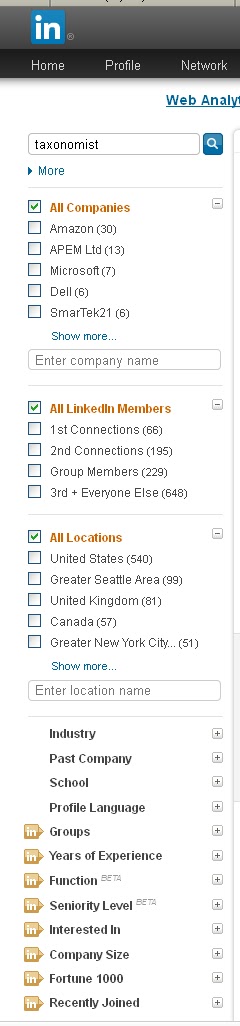
Facets that limit search results are typically displayed in the left-margin, so more facets can be created. However, the number of facets should be limited so that all of the facet labels (although not necessarily all of their contents/facet values/terms) display by default without scrolling. The first 4-6 terms or values within a facet should be displayed to give the user a good understanding of what is in there, with a link or button to “show more.” Scrolling can be used when a facet category is expanded. So, what needs to be considered is the vertical space if all facets display at least some values, and if that does not fit, whether some facets can be collapsed by default. The example below of the facets for limiting people search results on LinkedIn shows the default display of two facets with the first 6 terms, one facet with all 5 terms, and 12 facets collapsed (an unusually high number of facets).


What the tagging process supports

For manual tagging, you have to consider who is doing the tagging, what their knowledge and experience is, what level of training is practical, how much time and effort can practically be devoted to tagging, and what the tagging user interface looks like. As with the end-user UI, the tagging interface also needs to display all facets and facet values in an easy-to-use manner. Usually, people who tag content for internal content management are not dedicated indexers. To simplify tagging and ensure that it is done correctly and done at all, for internal tagging there should not be too many facets for internal tagging (such as around 3).

Organizations which tag/index content for subscription sale, on the other hand, where content indexing is core to their business, will invest in dedicated indexers who can be given thorough training in assigning terms from multiple facets and will also check their indexing for quality. Thus, for professional indexing, a greater number of facets can be supported.

In automated tagging, it’s not so much a matter of how many facets, but rather how distinct the facets are and how easy they are for automated tagging. There are different technologies out there, but, in general, named entities/proper nouns are easier to distinguish than topical subjects. So, facets for author, location, department, product name, etc., are easy to classify automatically. Language, and a document type that is based on file format are also straight-forward for auto-classification. Subject or Topic could be catch-all for high-ranked keywords. If you want to create facets for different kinds of topics, though, such as Purpose, Activity, Significance, Origin, etc., the distinctions will likely be too challenging for an auto-classification tool.

Monday, May 6, 2013

Topics and Document Types in Taxonomies


It’s quite common in a faceted taxonomy to have a Document/Content Type facet (I’ll call DocType here), whose terms define what a content item “is,” (a report, a blogpost, a form, a contract, a letter, a policy, etc.) and also a Topic or Subject facet, whose terms describe what a content item is “about” (legal compliance, training, new business, insurance, company information, etc.) While usually it’s pretty clear-cut what belongs in the DocType facet and what belongs in the Topic facet, occasionally there are some ambiguous concepts, so asking the questions “what is it?” versus “what is it about?” helps in making the distinction.

Often the taxonomist can resolve ambiguity by editing the term so that a one-word generic document type is appended to a descriptive word. For example “Marketing” by itself is a Topic, but “Marketing Material” is a DocType. This kind of decision is reached only after looking at the set of documents and determining whether there is a significant number of them that are really marketing materials versus a significant number of them that are really about marketing (and there could be both). You then have to decide how far to go with this. You could force otherwise topical concepts into DocTypes by adding the word “Document” to the end of many terms. For example, “Compliance” becomes “Compliance Document”, and Client Management” becomes “Client Management Document.”  Depending on your overall content set and taxonomy design, this may or may not be acceptable practice.

Another complicating issue that may come up in designing such a faceted taxonomy is what to do if certain Topics only occur in certain types of documents. This is not unusual. While DocTypes such as Report, Evaluation, Meeting Minutes, Memo, Article, Review, etc., are rather generic and could all be associated with any number of the same shared set of Topics, other DocTypes that a customized for a specific content set are more limited in their application. For example, Topics for different types of approval to be used only with a DocType of Approval Letter, or Topics for types of product information to be used only with a DocType of Product Information Sheet.

There are two ways to handle this issue: 

1. Create rules permitting certain Topics available as options only when certain DocTypes are assigned
This requires that DocType be assigned (tagged, indexed, matched, etc.) to a content item first, before the Topic is assigned. This can be seen as: the Topic is dependent on the DocType, or DocTypes terms drive the Topics, or the DocType takes precedence over the Topic. This is feasible with these facets, since a content item can be assigned only on DocType (in contrast with the possibility of getting assigned more than one Topic). What gets complicated, though, if there are additional rules between other facets, with the terms in one facet driving the availability of terms in other facets, such as File Type, Source, Department, etc. 


2. Merge the DocType and Topic facet into a single facet
This may seem extreme, but it could be practical, especially if it’s easier for the end-user. It works if the there are not so many Topic terms, such as not many more than the total number of DocType terms, the majority of them are applicable to a single  DocType term, and a user interface can be designed that supports an expandable/collapsible hierarchy, so a user clicks on a DocType and the applicable Topics underneath it display. Traditionally taxonomies are hierarchical after all. If a Topic term is valid for more than on DocType, then a valid polyhierarchy results. There could still be a distinct facet for File Type/Format (such as HTML, text, image, PDF, etc.), for which there would be no ambiguity, in contrast to the occasional ambiguity between DocTypes and Topics.
 

In either case—whether rules for the terms of one facet driving the availability of terms in another or whether a merged expandable hierarchical facet is created—collaboration is needed between the taxonomist and the technical experts who configure the implementation of taxonomy in the content/document management system.