Last week (September 30 – October 1) I attended the Text Analytics World conference in Boston as an invited speaker. This is the second year was fortunate to present at and attend this conference, which also meets in San Francisco in the spring. I posted a blog about the conference last fall, “Text Analytics and Taxonomies,” discussing the strong connections between taxonomies and text analytics in serving similar data/information retrieval goals. That connection between the two was again apparent at this year’s conference, with many speakers mentioning taxonomies, and I came away with additional analogies, beyond their shared purpose.
Problematic definition
Both taxonomies and text analytics are not well defined, and can have both a narrow definition and a broad definition. For taxonomies, the narrower meaning is a hierarchical tree of concepts arranged with broader and narrower relationships. The broad meaning of taxonomy is any controlled vocabulary, whether hierarchies, facets, thesauri, authority files, or simple terms lists to fill metadata fields. For text analytics, the narrower meaning is “text mining”, the process of deriving high-quality information contained in natural language text. But the conference chair, Tom Reamy of the KAPS Group, explained that the conference takes a broader definition of text analytics to include not only text mining but also, auto-categorization, sentiment analysis, predictive analytics, entity extraction, and machine learning.
There is also the issue of whether the name is appropriate. Some people don’t like the name taxonomies, and try to avoid it. Similarly, there are issues with the designation of “text analytics.” Discussion in the conference’s expert sessions and closing session, brought up the issue that perhaps a better name is needed for the field. Both “text” and “analytics” have issues, as they both have assumed narrower meanings. It comes out of the field of knowledge management, but that field is too broad. A more accurate label that Tom Reamy suggested was “unified data insights,” but it will stay text analytics for now.
Technology and human effort
Both taxonomies and text analytics rely on technology/software, but neither is a 100% automated solution, nor can the software products be used an out-of-the-box solutions without significant trained and skilled usage. If we consider the software as “tools” rather than “solutions,” we have a more realistic understanding of what the software can do. The process of building a taxonomy is aided by taxonomy or thesaurus management software, which is kind of a tool that an experienced taxonomist uses to manage the terms, relationships, synonyms, notes/definitions, and other term attributes. Similarly text analytics software, and auto-classification software in particular, requires expertise to leverage the tool for desired results. This was the theme of a presentation on selecting text analytics tools by Janine Johnson of Versik Analytics (who also used “tool” in her presentation title).
As I explained in my presentation, “Taxonomies for Auto-Tagging Unstructured Content,” both of the leading methods of auto-categorization, rules-based machine learning statistical methods, require considerable human input. In rules-based auto-categorization, experts need to write or edit rules for each taxonomy concept that leverage combinations of synonyms and proximity or other Boolean operators; and in machine-learning auto-categorization, experts need to identify and essentially pre-index a large set of sample documents for each taxonomy term, for the system to learn from the human indexed example.
Multidisciplinary background
Both taxonomies and text analytics are seen as a fields of expertise, methods of knowledge management, and at least parts of a solution to an organization’s information management problem. However they are not academic disciplines or majors. Rather, the educational background and skills of people who work in the fields of both taxonomies and text analytics is somewhat varied and multidisciplinary.
In taxonomies, library/information science is the most dominant background, but probably does not account for any more than half of practicing taxonomies. Information architecture/user experience design, database design, knowledge management, editorial, and subject matter (health, law, science, business, etc.) expertise are also common backgrounds.
In text analytics, computer science is the most common background. A show of hands of the conference participants indicated that the majority had computer science or engineering backgrounds. But linguistics is also important (although the small minority at this conference were more hesitant to reveal themselves). The keynote speaker, Dr. James Pennebaker, was a psychologist and explained why psychology is also important to text analytics. Participants in the closing expert panel answered my question on educational background with a similar answer of a combination of computer science/programming, linguistics, and cognitive sciences.
In addition to the interdisciplinary background of taxonomists and text analytics professionals, the applications of taxonomies and text analytics also span all disciplines and industries. Conference case studies included applications of text analytics in education, pharmaceuticals, healthcare, publishing, telecommunications, and federal agencies.
Sunday, October 6, 2013

Tuesday, September 17, 2013
Taxonomy Terms with “And”
In considering best practices for developing taxonomy term labels or names, there is the question about the use of the word “and” within taxonomy terms. My previous two blog posts were called “Tags and Categories” and “Card Sorting and Taxonomies,” which demonstrate how common it is to have the word “and” in titles, headings, or other labels. By extension, does it work in taxonomy terms?
The standards for taxonomies,
ANSI/NSIO Z39.19 Guidelines for the Construction, Format, and Management of
Monolingual Controlled Vocabularies and ISO 25964-1 Thesauri and Interoperability
with Other Vocabularies make no mention of terms with the word “and.” While it
is not explicitly prohibited, it is neither mentioned as an acceptable form
among the rather exhaustive list of term format types. Even the section on
compound terms makes no mention of terms with the word “and.” So, one might
conclude that terms should not have the word “and” within them. Yet it is not
uncommon, especially in larger, more specialized taxonomies and thesauri.
The simple little word “and”
can actually have two different meanings:
1) the intersection of two concepts, to include only that
which belongs to both, which is the Boolean operator AND
2) the combination or union of two concepts, to include
any of either, which is actually the Boolean operator OR.
When it comes to taxonomy
terms, the word “and” could have either of the above two usages, and it’s very
important to know which it is in which case.
“And” meaning AND
My blog post title “Card
Sorting and Taxonomies” involves the first meaning, the intersection of both
concepts, which in this case is the use and suitability of card sorting
specifically for taxonomies. “Card Sorting and Taxonomies” is more concise than
saying “the suitability of card sorting for taxonomies,” and taxonomy terms
need to be concise. Examples of the use of “and” in this (Boolean AND) meaning
in taxonomy terms that I have run across include:
Children and Television
Gender and Poverty
The choice of using “and” is
significant. It means any intersection/relation of these two concepts. “Children
and Television” comprises all of the following: children’s television shows,
the impact of television (not just children’s programming) on children, the depiction
of children in television, etc. Similarly “Gender and Poverty” covers various
issues, such as data on poverty rates by gender, how poverty effects the
genders differently, and reasons why more women are poor in developing
countries.
It is easy to identify this
meaning of the word “and” when the two concepts linked by the conjunction are
quite distinct. In many taxonomies, the preferred policy is to avoid creating
such terms, lest the taxonomy become too large and complex.
“And” meaning OR
My blog post title “Tags and
Categories” involves the second meaning, the combination of both concepts. I
described what tags were and what categories were and compared them. Examples
of the use of “and” in this (Boolean OR) meaning in taxonomy terms that I have
run across include:
Measurement and Analysis
Laws and Regulations
Roads and Highways
Maintenance and Repair
An additional example is the
title of the online course I teach: “Taxonomies
and Controlled Vocabularies.”
The main reason to create such
terms is that, while some content deals with one or the other of the two linked
words, a significant amount of content really has to do with both, and users
probably don’t care to make the distinction either, so it’s better to have just
a single concept in the taxonomy. But one word is not equivalent to the other,
so a taxonomy term cannot be created from just one word and the other designated
as its nonpreferred term/synonym. Another situation for these types of taxonomy
terms is a small browsable taxonomy that does not utilize/support synonyms. An
additional reason to create them is that they can boost SEO (search engine optimization) in website labels
by giving more words prominence. Finally, the combined terms can also appease
competing stakeholders who both want their preferred label as part of the term
name.
The difference in a taxonomy
If you have taxonomy terms
with the word “and” in them, it needs to be clear which of these two Boolean meanings
it is, not only to ensure accurate content tagging, but also to ensure the proper
relationship of the term to other terms in the taxonomy. Recently I was
reviewing a taxonomy with the term “Investment and Trade” and by itself, I
could not determine whether it meant the intersection of combination of these
two words, so I didn’t not know how it should be related to terms of
“Investment” and “Trade.”
A term with the Boolean AND
is a narrower term to terms of both its component parts, what is known as
polyhierarchy. “Children and Television” is narrower to both “Children” and to
“Television.” When there occurs a term with Boolean OR, such as “Measurement
and Analysis,” it is expected that the component words to not exist as
preferred terms in the taxonomy. Rather, each word “Measurement” and “Analysis”
could be nonpreferred terms/synonyms for “Measurement and Analysis.
Friday, August 30, 2013
Card Sorting and Taxonomies
Card sorting is a common technique in information architecture for developing the organization of menu labels or categories on websites. It would thus seem to be a very suited methodology for developing all kinds of taxonomies, but in actual practice card sorting is not utilized for most taxonomy projects, at least not in my experience.
Card sorting gets its name from the paper-based approach of having numerous category or concept names written down each on a small index card, and then the cards can be sorted on a table into logical categories. Multiple stakeholders and/or test users are given the opportunity in turn to organize the cards as they deem appropriate, and the person administering the card sort, takes note of the choices and considers them for the actual organization structure. Today, card-sorting software, especially that which is web-based to allow remote access, has largely replaced the physical cards.
There are two variants to card-sorting exercises, the open card sort and the closed card sort. In an open card sort, participants sort the labeled cards in any groupings they see fit and then they assign their category groups with any group name they want. In a closed card sort, the participants are already presented with a set of named top category groups that they cannot change, and are asked to sort the labeled cards into the pre-assigned categories. Each type of card sort has distinct objectives and is suited for different stages of the project.
Open card sorting is a good way to get a new taxonomy from scratch off the ground when you have some concepts (extracted from the content) and don’t know how to organize them. However, this is increasingly no longer the scenario. It’s rare to start creating a taxonomy from scratch with no other reference for top categories. There are so many taxonomies in existence now for all subjects, that it’s easy to find a starting point as a model. Furthermore, the owner of a taxonomy may have already designated the top categories for business reasons.
The aim of closed card sorting is to determine in what broader category narrower categories belong, especially if there is uncertainty. But if a narrower category could rightfully belong under more than one category, rather than force a choice between one or the other based on a card sort, the subcategory could belong under both. This is what taxonomists call “polyhierarchy,” and it acceptable as long as the hierarchy is sound and valid in both locations. Thus, closed card sorting is only needed when you have decided you do not want polyhierarchy. Polyhierarchy is generally a good thing, because it provides more than one navigation path to the same results, and different people choose different paths. Sometimes, however, polyhierarchy is avoided near the top levels of a taxonomy in order to maintain a sense of tree structure.
Card sorting is most practical for just two levels of hierarchy: concepts and their immediate parent categories. It’s possible but unwieldy to suggest to users that they may create three levels, and some card sorting software does not even allow it. Often it is more reliable to just run a second series of card sort testing for another hierarchical level in the taxonomy. However, running multiple card sort exercises for different hierarchical branches of a taxonomy can be quite impractical, if not also costly and time-consuming.
Finally, card sorting works only for traditionally hierarchical taxonomies. It does not work for faceted taxonomies, where terms from different facets/attributes are selected in combination to limit or filter search results. Faceted taxonomies are becoming increasingly common.
Card sorting continues to be useful for information architecture, though. When designing the structure of a website and its main and submenus, it can be difficult to decide what the categories should be, because the content of a site can be unique or nonstandard. Additionally, polyhierarchy is not expected in submenus and could be confusing. Finally, website navigation is often not deeper than two or three levels, unlike many taxonomies that are often four or five levels deep and thus impractical to thoroughly design or validate with card sorting.
Card sorting gets its name from the paper-based approach of having numerous category or concept names written down each on a small index card, and then the cards can be sorted on a table into logical categories. Multiple stakeholders and/or test users are given the opportunity in turn to organize the cards as they deem appropriate, and the person administering the card sort, takes note of the choices and considers them for the actual organization structure. Today, card-sorting software, especially that which is web-based to allow remote access, has largely replaced the physical cards.
There are two variants to card-sorting exercises, the open card sort and the closed card sort. In an open card sort, participants sort the labeled cards in any groupings they see fit and then they assign their category groups with any group name they want. In a closed card sort, the participants are already presented with a set of named top category groups that they cannot change, and are asked to sort the labeled cards into the pre-assigned categories. Each type of card sort has distinct objectives and is suited for different stages of the project.
Open card sorting is a good way to get a new taxonomy from scratch off the ground when you have some concepts (extracted from the content) and don’t know how to organize them. However, this is increasingly no longer the scenario. It’s rare to start creating a taxonomy from scratch with no other reference for top categories. There are so many taxonomies in existence now for all subjects, that it’s easy to find a starting point as a model. Furthermore, the owner of a taxonomy may have already designated the top categories for business reasons.
The aim of closed card sorting is to determine in what broader category narrower categories belong, especially if there is uncertainty. But if a narrower category could rightfully belong under more than one category, rather than force a choice between one or the other based on a card sort, the subcategory could belong under both. This is what taxonomists call “polyhierarchy,” and it acceptable as long as the hierarchy is sound and valid in both locations. Thus, closed card sorting is only needed when you have decided you do not want polyhierarchy. Polyhierarchy is generally a good thing, because it provides more than one navigation path to the same results, and different people choose different paths. Sometimes, however, polyhierarchy is avoided near the top levels of a taxonomy in order to maintain a sense of tree structure.
Card sorting is most practical for just two levels of hierarchy: concepts and their immediate parent categories. It’s possible but unwieldy to suggest to users that they may create three levels, and some card sorting software does not even allow it. Often it is more reliable to just run a second series of card sort testing for another hierarchical level in the taxonomy. However, running multiple card sort exercises for different hierarchical branches of a taxonomy can be quite impractical, if not also costly and time-consuming.
Finally, card sorting works only for traditionally hierarchical taxonomies. It does not work for faceted taxonomies, where terms from different facets/attributes are selected in combination to limit or filter search results. Faceted taxonomies are becoming increasingly common.
Card sorting continues to be useful for information architecture, though. When designing the structure of a website and its main and submenus, it can be difficult to decide what the categories should be, because the content of a site can be unique or nonstandard. Additionally, polyhierarchy is not expected in submenus and could be confusing. Finally, website navigation is often not deeper than two or three levels, unlike many taxonomies that are often four or five levels deep and thus impractical to thoroughly design or validate with card sorting.
Wednesday, July 31, 2013
Tags and Categories
What does a taxonomy comprise and how does it work? Professional taxonomists may speak of “terms,” “nodes,” or “labels,” whereas most other people with a basic understanding of taxonomy might refer to “tags” or “categories.” A category is a well understood concept, and social media sites have made the notion of “tag” well known.
In addition to the different professional level of such jargon, there is also a distinction in meaning. Ironically, it’s the professional terminology that is vague and the layman terminology that is more specific. Taxonomy “terms,” “nodes,” or “labels,” are all pretty generic and can all have various applications for different kinds of taxonomies, both for broad categorization and for specific indexing. “Tags” and “categories,” on the other hand, each tend to have distinct meanings. It’s not so much what they are, or even how they are organized, but rather how they are used.
Tags are for tagging.
That seems obvious. As for what is meant by “tagging,” that implies you put a tag on something. In fact, you can put more than one tag on something, and that’s typically encouraged in tagging. “Something” is typically an electronic file of some form of content, a document, image, video, database record, blog post, etc. Tags tend to be a brief label indicating what something is about. Tags can be very specific or relatively broad. Information professionals might prefer to call them “index terms.” An organized, alphabetized list of tags could serve as an index.
Categories are for categorizing.
This can also be called grouping or classifying. It implies putting something into a category, often represented as a file folder, whether an actual electronic folder path, or just a depiction of a folder icon. While categories have different levels of specificity, the name category implies a collection of things, so there is an implicit understanding that categories don’t get too specific. An organized structure of categories typically constitutes a hierarchical taxonomy.
Can something go into more than one category? In physical folders no (unless you make photocopy of the document for each folder), but in the digital world, often the answer is yes, but not always (again requiring the copying of files). It depends on the system, and it may involve some workaround. Even when it is possible to put a content item into more than one category, unlike tags, it is still preferable to have most content items assigned to only one category and a smaller number of them that may belong in two categories. For example, there may be a breadcrumb trail for the hierarchy of categories, and the breadcrumb trail may only take a single path. The idea is that the categories retain distinct meaning and usage through mostly distinct content.
Tags and categories together
Because tags and categories are different, it is possible to have both at the same time, especially if the categories are deliberately kept broad and the tags are relatively specific. Content management systems and digital asset management systems increasingly offer features of both categories and tags for managing content. In these cases, the challenge is to decide to what degree of classification to use the categories and to what degree to use the tags. That's exactly what I have done as a taxonomist on two recent consulting projects.
For the amateur taxonomist and indexer, one of the most common exposures to tags and categories is through blogs. Blogging software may permit the blog author to assign a tag or category to a blog post. Whether the tags and categories are appropriately named and used is another issue, though. Blogger.com provides only one option, which it calls "Labels" and utilizes an icon for a tag in the blogging interface, but then displays them when published in the right margin under a heading called "Categories." No wonder my "categories" don't look good; I had created them as if they were tags. Furthermore, the very specific subject matter of "The Accidental Taxonomist" blog makes its posts more suited for tagging than for categorizing. WordPress, on the other hand, gives the blogger both tools: tags and categories. If “The Accidental Taxonomist” blog eventually moves, you’ll know why.
In addition to the different professional level of such jargon, there is also a distinction in meaning. Ironically, it’s the professional terminology that is vague and the layman terminology that is more specific. Taxonomy “terms,” “nodes,” or “labels,” are all pretty generic and can all have various applications for different kinds of taxonomies, both for broad categorization and for specific indexing. “Tags” and “categories,” on the other hand, each tend to have distinct meanings. It’s not so much what they are, or even how they are organized, but rather how they are used.
Tags are for tagging.
That seems obvious. As for what is meant by “tagging,” that implies you put a tag on something. In fact, you can put more than one tag on something, and that’s typically encouraged in tagging. “Something” is typically an electronic file of some form of content, a document, image, video, database record, blog post, etc. Tags tend to be a brief label indicating what something is about. Tags can be very specific or relatively broad. Information professionals might prefer to call them “index terms.” An organized, alphabetized list of tags could serve as an index.
Categories are for categorizing.
This can also be called grouping or classifying. It implies putting something into a category, often represented as a file folder, whether an actual electronic folder path, or just a depiction of a folder icon. While categories have different levels of specificity, the name category implies a collection of things, so there is an implicit understanding that categories don’t get too specific. An organized structure of categories typically constitutes a hierarchical taxonomy.
Can something go into more than one category? In physical folders no (unless you make photocopy of the document for each folder), but in the digital world, often the answer is yes, but not always (again requiring the copying of files). It depends on the system, and it may involve some workaround. Even when it is possible to put a content item into more than one category, unlike tags, it is still preferable to have most content items assigned to only one category and a smaller number of them that may belong in two categories. For example, there may be a breadcrumb trail for the hierarchy of categories, and the breadcrumb trail may only take a single path. The idea is that the categories retain distinct meaning and usage through mostly distinct content.
Tags and categories together
Because tags and categories are different, it is possible to have both at the same time, especially if the categories are deliberately kept broad and the tags are relatively specific. Content management systems and digital asset management systems increasingly offer features of both categories and tags for managing content. In these cases, the challenge is to decide to what degree of classification to use the categories and to what degree to use the tags. That's exactly what I have done as a taxonomist on two recent consulting projects.
For the amateur taxonomist and indexer, one of the most common exposures to tags and categories is through blogs. Blogging software may permit the blog author to assign a tag or category to a blog post. Whether the tags and categories are appropriately named and used is another issue, though. Blogger.com provides only one option, which it calls "Labels" and utilizes an icon for a tag in the blogging interface, but then displays them when published in the right margin under a heading called "Categories." No wonder my "categories" don't look good; I had created them as if they were tags. Furthermore, the very specific subject matter of "The Accidental Taxonomist" blog makes its posts more suited for tagging than for categorizing. WordPress, on the other hand, gives the blogger both tools: tags and categories. If “The Accidental Taxonomist” blog eventually moves, you’ll know why.
Thursday, June 6, 2013
How Many Facets
Faceted taxonomies (taxonomies with attributes, dimensions, filters, etc. to limit search results based on the combination of selected criteria) are becoming increasingly popular with the support of web database technology. Unlike traditional hierarchical taxonomies, designing a faceted taxonomy first requires a decision on how many facets to create. There are various factors to take into consideration.
What the content supports
What the end-user user interface supports
Sometimes a website or intranet is created in a web content management system that does not give as much flexibility in taxonomy display. For example, SharePoint requires a horizontal list of facets, if the facets are to be used to filter content displayed in “columns,” where facet names are the column headers. Furthermore, SharePoint will by default create columns for document format type, content type, author, date created, and date modified. While you can hide these columns, if you want to use some of these defaults, that will limit the number of other descriptive facets for columns to about three or four.
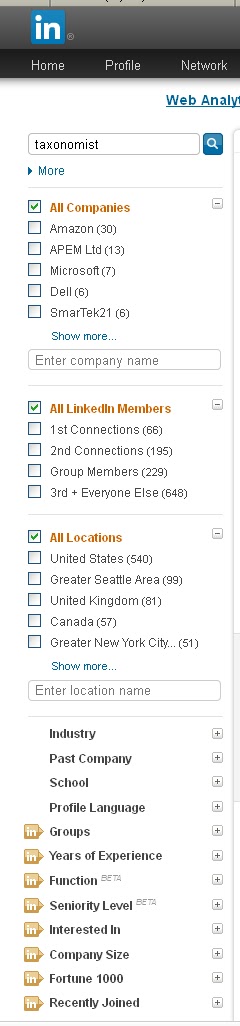
Facets that limit search results are typically displayed in the left-margin, so more facets can be created. However, the number of facets should be limited so that all of the facet labels (although not necessarily all of their contents/facet values/terms) display by default without scrolling. The first 4-6 terms or values within a facet should be displayed to give the user a good understanding of what is in there, with a link or button to “show more.” Scrolling can be used when a facet category is expanded. So, what needs to be considered is the vertical space if all facets display at least some values, and if that does not fit, whether some facets can be collapsed by default. The example below of the facets for limiting people search results on LinkedIn shows the default display of two facets with the first 6 terms, one facet with all 5 terms, and 12 facets collapsed (an unusually high number of facets).

What the tagging process supports
Organizations which tag/index content for subscription sale, on the other hand, where content indexing is core to their business, will invest in dedicated indexers who can be given thorough training in assigning terms from multiple facets and will also check their indexing for quality. Thus, for professional indexing, a greater number of facets can be supported.
In automated tagging, it’s not so much a matter of how many facets, but rather how distinct the facets are and how easy they are for automated tagging. There are different technologies out there, but, in general, named entities/proper nouns are easier to distinguish than topical subjects. So, facets for author, location, department, product name, etc., are easy to classify automatically. Language, and a document type that is based on file format are also straight-forward for auto-classification. Subject or Topic could be catch-all for high-ranked keywords. If you want to create facets for different kinds of topics, though, such as Purpose, Activity, Significance, Origin, etc., the distinctions will likely be too challenging for an auto-classification tool.
Subscribe to:
Posts (Atom)